I'm a diehard Mac and Firefox user, and if I were Queen of the Universe, everyone else would be, too. My royal aspirations aside, I realize that I have to take into consideration The Browser That Can't Be Named when developing a site. On average, about 58% of all people are still using some version of TBTCBN. At my place of employment, I'm sorry to say, that number is even higher—up to 68% of ASU's web visitors are poor, misguided souls. Because I develop locally on a Mac with MAMP, I don't test in TBTCBN as much or as often in the process as I should. Until now. This weekend I discovered a few tricks for MAMP and VMWare Fusion that will make testing in TBTCBN a whole lot easier.
Get MAMP working in VMWare
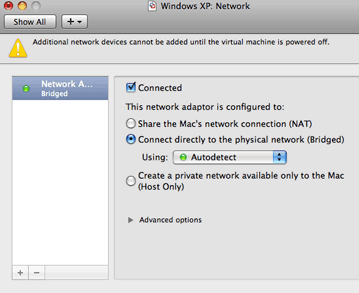
- In VMWare Fusion, go to Virtual Machine > Settings > Network. Make sure your Network settings are set to Bridged.
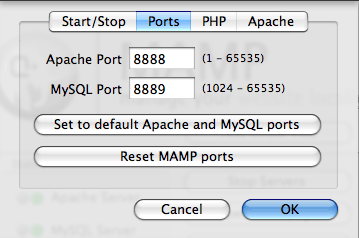
- In MAMP, click on Preferences > Ports and check that your MAMP ports are 8888 and 8889.
- Find your Mac's IP address. From the Apple, go to About This Mac > More Info... > Network and find the "IPv4 Address." It's usually something like 192.168.xxx.xxx.
- Open VMWare and start WIndows. In My Computer, click on Local Disk (c:), and navigate to the file located at C:\WINDOWS\system32\drivers\etc\hosts. Open /hosts using Notepad. You'll see a list of at least a few IPs followed by a site name. Add your Mac's IP address and a name for your site. For instance, I added:
192.168.0.23 myawesomesite - Now you should be able to open http://myawesomesite:8888 in IE.
I work primarily with Drupal, and this setup works like a dream for me. However, I've read that this may not work with some applications, such as WordPress, which require a a base URI of localhost:8888. Because IE has it's own separate localhost, "localhost:8888" won't work, which is why we renamed it to something else (like myawesomesite).
A couple more tips I picked up along the way that may help streamline your process:
- Say good-bye to good old MultipleIE. IE8 (yes, I named it) is the only IE you really need if, like me, your organization no longer fully supports IE6 (yay! ASU). The Developer Tools for IE8 allow you to switch your browser mode to IE7, which is pretty nice, considering it's TBTCBN.
- You can set IE to open when you start your Mac. Open IE in VMWare, and switch to Unity view. The IE icon will appear in your dock. Right-click on the icon and select Keep in Dock and Open at Login.
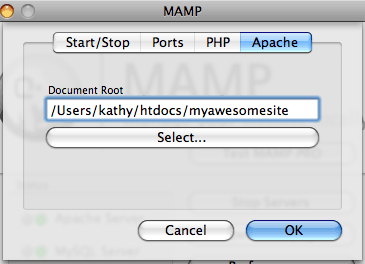
- In MAMP, I had a problem with relative paths not working on my local site, which was at http://localhost:8888/myawesomesite. I discovered it's easy to reset the location of your root directory In MAMP. Click on Preferences > Apache, and set your "Document Root" to your site.


Comments
Hold the phones! After setting everything up, I found Sean Sperte's "Setting Up a Killer, Local Web Development Environment on a Mac With MAMP and VirtualHostX." Now that's a setup that *really* rocks! I'm going with this one.